|
Scheme AIDE can execute commands from a Scheme procedure input file, as illustrated with the initialization file
acisinit.scm. A Scheme procedure file can contain commands that create objects, perform actions, set options, etc. An input file is a text file containing Scheme commands and, optionally, comments. Refer to the
Scheme Support Component Manual for more information on creating Scheme procedure files.
|
|
|
The Scheme command
load is used to load and execute an input Scheme procedure file. The input file must exist in your working directory (or in your load path), or you must include the path when you specify the filename. To run Example 6-2, use a text editor to create a text file in your working directory named
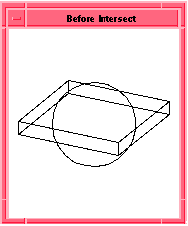
test.scm containing the text in Example 6-1. Figure 6-1 shows the result of loading this file.
|
|
|
; Sample input file test.scm
|
|
(define b1 (solid:block (position -20 -20 0) (position 20 20 5)))
|
|
;; b1
|
|
(define s1 (solid:sphere (position 0 0 0) 15))
|
|
;; s1
|
|
(define new (bool:intersect b1 s1))
|
|
;; new
|
|
|
Example 6-1. Sample Command Input File
|
|
|
|
|
Figure 6-1. Command Input File
|
|
|
; Delete all entities from the view
|
|
(part:clear)
|
|
;; #t
|
|
; Load the Scheme input file test.scm
|
|
(load "test.scm")
|
|
;; ()
|
|
|
Example 6-2. Executing the Command Input File
|