|
Example 6-4 rotates the body
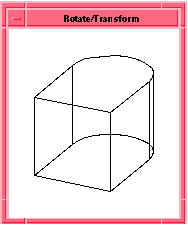
u1 (after the union) from Example 6-3 so you can view it from a different angle. A transform is first defined, then applied to the body. Figure 6-3 shows the rotated body.
|
|
|
; (part:clear)
|
|
; Create a solid block
|
|
(define b1 (solid:block (position -20 -20 -20)
|
|
(position 20 20 20)))
|
|
;; b1
|
|
; Create a cylinder
|
|
(define c1 (solid:cylinder (position 20 0 -20)
|
|
(position 20 0 20) 20)))
|
|
;; c1
|
|
; OUTPUT Before Union
|
|
; Unite the two bodies into a new body
|
|
(define u1 (bool:unite b1 c1))
|
|
;; u1
|
|
; Define a transform, t1, to rotate an object about the z-axis by
|
|
; 90 degrees
|
|
(define t1 (transform:rotation (position 0 0 0 )
|
|
(gvector 0 0 1) 90))
|
|
;; t1
|
|
; OUTPUT After Union
|
|
; Apply the transform t1 to the body u1
|
|
(entity:transform u1 t1)
|
|
;; #[entity 2 1]
|
|
; OUTPUT Rotate/Transform
|
|
|
Example 6-4. Rotate Body
|
|
 
|
|
|
|
|
Figure 6-3. Rotate Body
|