|
A body is the highest level topological entity. Solid bodies contain lumps, shells, subshells, faces, loops, coedges, edges, and vertices. Wire bodies contain wires, coedges, edges, and vertices. A simple list of edges can be used to create topology, and
ACIS creates the other associated topological entities. The result is a model whose elements know about each other and the topology can be traced.
|
|
|
Many operations, such as wire offsetting, utilize the features of a body topological element and the inherent ability to trace its topology through adjacent wires and edges. This is why a (wire) body is required as input to these operations.
|
|
|
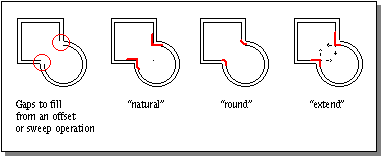
When a wire body is offset, sometimes gaps are created at certain junctures. Consider a wire body made up of a square and a circle that is offset towards the inside, as shown in figure 8-1. The resulting gaps can be filled as one of three types:
|
|
|
Natural
|
Extends the two shapes along their natural curves; e.g., along the circle and along the straight edge, until they intersect.
|
|
|
Round
|
Creates a rounded corner between the two segments.
|
|
|
Extend
|
Draws two straight lines from the ends of each segment until they intersect.
|
|
|
|
|
Figure 8-1. Gap Fill Types
|
|
|
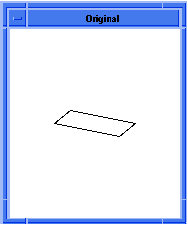
In the following example, four linear edges are created. Even though the end points of each edge were picked such that the edges appeared to intersect in a simple rectangular frame, the edges are independent and know nothing about one another. In other words, the edges are separate topological entities but are not part of a topology.
|
|
|
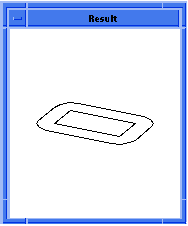
Offsetting occurs to the outside of a rectangle. By default, the wire offsetting fills the external gap using the "round" option. The result is a second wire body that is mostly rectangular except for rounded corners. The radius of the rounded corner is the wire offset amount. Refer to figure 8-2.
|
|
|
Scheme Example
|
|
|
; Define the positions to be used
|
|
(define my_point1 (position 0 0 0))
|
|
;; my_point1
|
|
(define my_point2 (position 20 0 0))
|
|
;; my_point2
|
|
(define my_point3 (position 20 10 0))
|
|
;; my_point3
|
|
(define my_point4 (position 0 10 0))
|
|
;; my_point4
|
|
|
; Create edge 1 as a sine edge.
|
|
(define my_linear1 (edge:linear my_point1 my_point2))
|
|
;; my_linear1
|
|
; Create edge 2 as a linear edge.
|
|
(define my_linear2 (edge:linear my_point2 my_point3))
|
|
;; my_linear2
|
|
; Create edge 3 as a spline curve.
|
|
(define my_linear3 (edge:linear my_point3 my_point4))
|
|
;; my_linear3
|
|
; Create edge 4 as a spline curve.
|
|
(define my_linear4 (edge:linear my_point4 my_point1))
|
|
;; my_linear4
|
|
|
; Create a wire-body from a list of edges.
|
|
(define my_wirebody (wire-body
|
|
(list my_linear1 my_linear2 my_linear3 my_linear4)))
|
|
;; my_wirebody
|
|
(define my_offset (wire-body:offset my_wirebody 5 "r"))
|
|
;; my_offset
|
|
; If desired, you could delete the original wire body;
|
|
; it is no longer needed.
|
|
;(entity:delete my_wirebody)
|
|
;; ()
|
|
; Save the results to an output file.
|
|
(part:save "tmpoffset1.sat")
|
|
;; #t
|
|
|
|
|
Figure 8-2. Wire Body Offset
|
|
|
Some of the Scheme extensions related to wire bodies are:
|
|
|
wire-body
|
Creates a wire body from a list of edges.
|
|
|
wire-body:kwire
|
Creates a planar wire specified by a sequence of points and "bulge" factors.
|
|
|
wire-body:offset
|
Creates a new wire by offsetting the given wire using offset and twist laws.
|
|
|
wire-body:points
|
Creates a wire body from a list of positions.
|