|
3D ACIS Online Help consists of a set of HTML documents that are accessed through your Internet browser. We recommend the following browsers:
|
|

|
Netscape Communicator, version 4.x
|
|
|
Microsoft Internet Explorer, version 4.0 or later
|
|
|
JavaScript must be enabled.
|
|
|
Note
|
Some online help features are not fully supported in earlier versions of Netscape Navigator and Microsoft Internet Explorer.
|
|
|
To start online help, you must load the HTML file
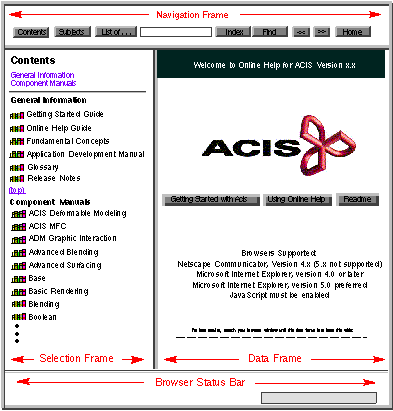
ACIS.HTM into your browser. The online help screen is divided into three frames--navigation, selection, and data--as illustrated in Figure 1-1. Refer to Chapter 2,
Navigation, for information about all the parts of the online help screen and navigating through the system.
|
|
|
|
|
Figure 1-1. Online Help Screen at Startup
|