|
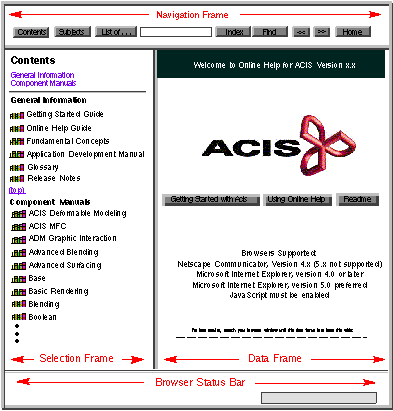
Figure 2-1 illustrates the online help screen layout. The online help screen consists of three frames and a browser status bar:
|
|
|
Navigation frame
|
Allows you to choose the way you want to locate information in online help, to browse through topics, or to return to the home page. The navigation frame is the horizontal frame stretching across the top portion of the screen. It contains several gray buttons and a search text box.
|
|
|
Selection frame
|
Allows you to select a specific item (topic) to view. The selection frame is the left vertical frame.
|
|
|
Data frame
|
Displays the topic that you selected from the list in the selection frame. The data frame is the right vertical frame.
|
|
|
Browser status bar
|
Displays messages, filenames, and brief link descriptions. The status bar is stretched across the bottom of the screen.
|
|
|
Note
|
Figure 2-1 illustrates the frames and status bar, and may not show the exact text that would be displayed for the current release.
|
|
|
|
|
Figure 2-1. Online Help Screen Splash Page
|