|
Contents displays a list of
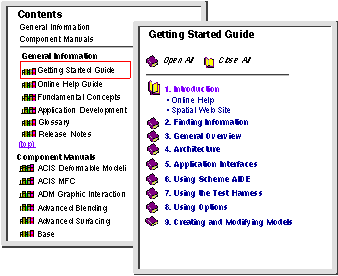
ACIS manuals/books organized into chapters. This list of
ACIS books is categorized by
General Information and Component Manuals. Click on the bookshelf icon to the left of the book name to display the entire table of contents for that book. The table of contents is displayed in the selection frame. The
Contents button is particularly useful when you want to view or read through a book in chapter order. Supporting information, such as summaries, can be found in the appendices of each book.
|
|
|
Click on
Contents to display a list of all the books available for
ACIS products and components.
|
|

|
The selection frame displays a list of all available books.
|
|
|
Use the scroll bar as necessary. The table of contents for any of the books can be displayed by clicking on the bookshelf icon for that book.
|
|
|
Click on the closed book icon to the left of the chapter title to display the subheadings for that chapter. The closed book icon changes to an open book icon. The contents of the file are displayed. Click on the (open) book icon again to close the chapter. Click on the 'Contents' button in the navigation frame to return to the list of books.
|
|
|
Click on the name of the chapter or heading to open the help file and expand the subheadings for the book.
|
|
|
Use the browse buttons (<< or >>) or the browser's
Back and
Forward buttons to browse through information in page order. This is useful for perusing a manual page by page.
|
|
|
Attention New Users!
|
|
|
To peruse the documentation set by knowledge level, from beginning level topics to more advanced topics, begin with the
3D ACIS Getting Started Guide. Once you have a basic understanding of
ACIS and geometric modeling concepts and terminology, proceed to the
3D ACIS Fundamental Concepts Guide, and then to the component or subject of interest.
|
|
|
|
|
Figure 2-3. Selection Frame Contents
|