|
The
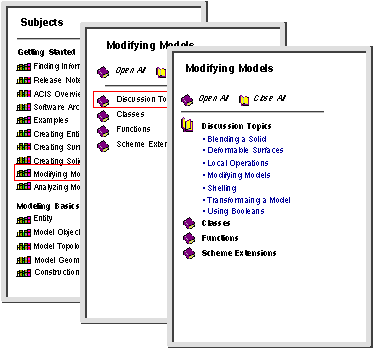
Subjects button displays (in the selection frame) a list of links for the given subject. A
subject can be a category, feature, function, etc. A
subject is a means by which software items and information are organized to facilitate research or discussion. Related subjects are gathered into broader categories to allow easier and more logical navigation through the documentation. This also serves to gather together all available documentation based on a subject or idea.
|
|
|
To display a list of functional categories for
ACIS subjects, click on
Subjects.
|
|

|
The selection frame displays a list of all available subjects. The subjects are grouped conceptually by topic, regardless of whether the topic is a beginner level or advanced level. (To peruse the documentation set by knowledge level, from beginning level topics to more advanced topics, select
Contents instead of
Subjects and begin with the
3D ACIS Getting Started Guide.)
|
|
|
Using the scroll bar as necessary, click on the bookshelf icon for the subject that interests you.
|
|
|
The selection frame displays a list of all information available for that subject. This includes code types and/or discussion topics. Click on the book icon for the code type or topic that interests you. A list of available items for that topic is displayed.
|
|
|
Click on the name of the item to open the help file. The contents of the help file are displayed in the data frame.
|
|
|
|
|
Figure 2-4. Selection Frame Subjects
|