|
The
List of . .
. button displays the links to all of the available reference material by its type, such as classes, functions, Scheme extensions, etc.
List of . . . displays alphabetical listings of various code types. A
type is a type of reference information, usually an interface, or means of interacting with
ACIS models. Types of information include classes, functions, Scheme extensions, and Scheme data types, shaders and shader utilities, test harness commands, etc. These lists are all inclusive of the entire product line. The lists also include derivation lists, syntax summary lists, and reference or action/purpose statement lists.
|
|
|
Note
|
The Derivation, Reference and Syntax Summaries for the various code types are useful to print and save for easy reference.
|
|
|
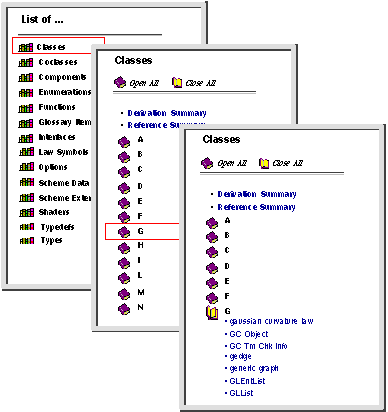
To display a list of the available code types for
ACIS, click on
List of . . ..
|
|

|
The selection frame displays an alphabetical list of all available classes.
|
|
|
Using the scroll bar as necessary, click on the bookshelf icon to access Derivation Summary, Reference Summary, or click on the closed book icon for the first letter of the class name, e.g., 'G' to access the information for the Class gaussian_curvature_law.
|
|
|
Click on the name of the item to open the help file. The contents of the help file are displayed in the data frame.
|
|
|
Figure 2-5. Selection Frame List of ...
|