|
The
Index function allows you to scan the index of the complete set of manuals just like you would with a printed book. When using the
Index search function, be aware of the
Index search limitations. The
Index search:
|
|

|
Does not allow wildcards
|
|
|
Is based on the first letter of the character string entered
|
|
|
Is not case sensitive
|
|
|
Does not allow use of the
Browse (<< and >>) buttons to step through the search results
|
|
|
Is not supported on Macintosh platforms, due to browser limitations
|
|
|
To use the
Index search function, enter the text string that you want to search for in the space provided and click on
Index.
|
|
|
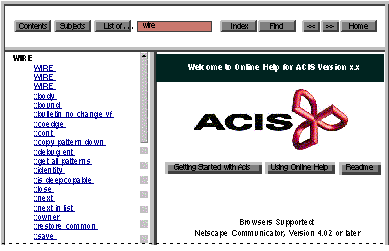
The index page (with the entry closest to the text string you entered in the search field) is displayed in the selection frame.
|
|
|
|
|
Figure 2-6. Selection Frame -- Index Search
|